Saturday, October 28, 2006

Moblogging: Turn it on again

Some time ago in Turn on, tune in... send email! I wrote about how I asked the students to email pictures from their mobiles to a PGDE(S) Flickr account and from there it was automatically forwarded to the a PGDE(S) blog. It worked. It was fun! I wanted to do something else with mobiles, but wasn't sure what.
Technology -
Technology - "Future Vision",
originally uploaded by $ydney
I thought of getting students to send in questions by texting them to me... then I wondered if the texts could be forwarded to an email address instead of me having to read them off my phone... then I thought if they can be emailed, they can be sent to Blogger... the final bit of the jigsaw for me was wondering if we could have a separate screen to display an updated list of submitted questions while we presented on another screen. However I dismissed that idea as a step too far.

...But then when I told Ewan what I was planning, he emailed back to say, "Wouldn't it be cool if we had a separate screen for the questions...". So I asked the technicians (at ridiculously short notice) and they said, "Yes!". :-)

The attendance at the lecture was ridiculously poor. (I suppose Friday afternoon isn't the best time slot.) However, I enjoyed myself. Ewan enjoyed himself (I think - see his post from before and during the session). Also, I think that most of the students enjoyed themselves. I hope that they were inspired. (They know where my blog is now, so perhaps some will tell me here.) Why not watch the video and let me know what you think. :-)

Coming up with the idea of texting questions was easy but I thought doing it might be trickier. However, Google came to the rescue. A quick search threw up a step-by-step guide on the iX Conference Wiki about how to use a free service from intelliSoftware. The wiki even suggested making the blog auto-refresh every thirty seconds to keep the content displayed up-to-date. Brilliant! The only problem is that the sender's phone number is displayed as the subject of the post. (I've edited the numbers out now, but they were there for a good while until I had time to go in and fix it.) For that reason, I wouldn't use this technique in a school. However, I'm going to contact the techie types at the University and intelliSoftware to see if there is any way to hide the numbers.

I think the texted questions added something to the presentation. Some of the comments were silly, some were fun, some were interesting, some were useful... all of them added something to the session. I would definitely do it again.


Technorati Tags: , , , , , , , ,

Powered by performancing firefox

Wednesday, October 18, 2006

One Day In History

I heard about the One Day In History project on the radio yesterday and thought it would be interesting to give it a go. I took various pictures throughout the day to illustrate my post, but the history blog seems to be text only, so I thought I'd do it here with illustrations and then do a text only version on the One Day In History site as well.

I got up this morning at about ten past six, as usual, and took the dogs out for a walk. It was dark and it was raining. It is the October week school holiday and so my wife the English teacher and daughters 1 to 3 all had a lie in. Scunners! I left the house a bit later than usual because I find it really hard to motivate myself when everybody else in the house is still sleeping. I heard about the One Day In History project on the radio while driving to work at Jordanhill (the Education Faculty of the University of Strathclyde in Glasgow). Thought I'd give it a go. We were invited to note connections with historic events or buildings during our day but they also said that things we consider ordinary may be of great interest to historians in the future. I'm not sure what people in the future may be interested in, but I am interested in technology, so I will try to note a few things about the technology I use during the day.

Sparse diary
Sparse diary,
originally uploaded by DavidDMuir
At the office, I checked my diary to see what was coming up. I use a digital diary - an old Palm m130 which has been dropped umpteen times and chewed by the dogs but it still keeps me more or less on track. This week is fairly quiet with only two classes and one meeting but the meeting and one class happened today. Both of today's events are tangentially related to the One Day In History project in that the meeting was with a researcher on how I use tools such as podcasts and wikis and blogs (oh my!) in my teaching and the class was about educational uses of online photo sharing sites.

Marking
Marking,
originally uploaded by DavidDMuir
However, the day starts with marking! I hate marking, but this is marking that is more than overdue. It is completely and utterly late.

It takes a while but when I finish the marking I felt that I'd earned a tea break.

We headed down to the cafe where I had a cup of tea and a scone.
Tea and scone
Tea and scone,
originally uploaded by DavidDMuir
The scones at Jordanhill are legendary. They are fresh baked every day on campus and if you get there at the right time, they are still hot from the oven. Earlier this year the decision was taken to sell off the Jordanhill Campus and move the Education Faculty into the centre of Glasgow to be beside the rest of the faculties. There are, no doubt, many advantages in this move, but one major disadvantage, I suspect, will be the loss of the catering facilities and, in particular, the loss of the Jordanhill scone. This move (assuming it happens) will end a long association of this area of Glasgow with teacher education. The land was bought in 1911 and work began on the David Stow Building that same year although the move to the Jordanhill Campus did not take place until 1921.

The paperless office?
The paperless office?,
originally uploaded by DavidDMuir
After tea break I arranged for some handouts to be printed off on the photocopier. The paperless office has never materialised and the place of the photocopier (or some other paper copying machine) seems safe for many years to come. I then dashed off to my meeting which was on the other campus not far from George Square in the centre of Glasgow. The researcher was running late with the previous group so I had time for a quick chat with a colleague about a staff development module we are running called "Internet Communications". This will be our first time teaching the module and we are still trying to finalise exactly what we will do with it.
Coffee @ CAPLE
Coffee @ CAPLE,
originally uploaded by DavidDMuir
I had time for a cup of tea before meeting the researcher. Unfortunately because we started late, I had to leave early to get back to Jordanhill for my class.

The class was a BEd 4 option class where we look at the uses of Information and Communication Technology in education. (BEd 4 means they are undergraduates in their fourth year of a four year Bachelor of Education degree.) I talked about the educational uses of online photo sharing before setting some practical work involving Flickr and digital cameras.
Lunch
Lunch,
originally uploaded by DavidDMuir
While they did the practical work, I was very unprofessional and ate my lunch - a chicken tikka sandwich and a can of Barr's Irn Bru.

After the class I did a bit of tidying up, checked my email and got a couple of things ready for next week.

During the day I used a variety of different personal computers. In my office I use both a very old Viglen computer running Windows XP and a slightly newer Macintosh computer running OS X. I also used a Windows XP laptop to run the presentation for the BEd class.

New hairdo!
New hairdo!,
originally uploaded by DavidDMuir
I headed home shortly after five o'clock. Daughter number 1 had been to the hairdressers and her hair was shorter by about 8 inches (approximately 20 centimetres). I am ashamed to say, daughter number 3 had to draw this to my attention before I noticed.

Church expansion
Church expansion,
originally uploaded by DavidDMuir
Before tea (chicken - made by daughter number 1) I went to have a look at our church. The building is 80 years old this year and we are currently expanding and refurbishing our halls.

After tea, three of us went round to a friend's new home. She has just moved in (boxes everywhere!) and I was to help by putting up a couple smoke detectors and building her daughter's bunk bed. (Slightly worried that after re-building the bed, I had one bolt left over...) While we were working there, the ice-cream van came round. Brilliant - we don't have one where we stay now but in our last house we often looked forward to a late night ice-cream from the van. It was good to get a snack just as we were completing the bed. :-)

After that, it was home for supper and the last thing before bed was to take the dogs out for another walk. It was dark and it was raining!

That's my day. I hope someone now, or in the future, finds it interesting. :-)


Technorati Technorati Tags: , ,

Powered by performancing firefox

Tuesday, October 17, 2006

Jowlers and other photo projects

I can't seem to get out of silly post mode these days... I'll start with the very silly and then move onto the slightly more useful.

David Jowling
David Jowling,
originally uploaded by DavidDMuir
While looking for ideas for an upcoming EduFlickr post, I came across the Jowlers website. This is a deceptively simple idea that produces some bizarre results. All you do is shake your head rapidly from side to side while somebody takes a picture. That's it. No fancy Photoshop techniques, no clever lenses for your camera. Just shake your head and take a picture. It took us a few goes to get the best result and I was getting a bit of a headache by the end, but I think you'll agree the result is rather fetching. Blue didn't want to be left out, so I posted one of him jowling too. Enjoy! {If anyone is up for the challenge... leave a comment here giving an educational justification for jowling in the classroom! :-) }

The slightly more useful part of this post is a link to the site that directed me to Jowlers in the first place. The site is called Photojojo and claims to "...find the best photo shiz anywhere"! I'm not sure what a "shiz" is, but it seems to be a good thing. :-) The site allows you to subscribe to a twice weekly newsletter that gives tricks, tips and projects related to digital photography. An archive of past newsletter entries is available on the site. Recent items that caught my attention include the Jowlers site listed above, Project 365 (How to Take a Photo a Day and See Your Life in a Whole New Way), Keep the Juice Flowing (Digital Camera Battery Life Tips), The DIY CanFrame (Transform a Tin Can into a Simple Photo Frame in 15 Minutes) and PhotoGlow (An Enlightened Photo Frame).

They publish huge range of ideas from practical tips (like prolonging battery life) to practical projects (like using a can as a photo frame). Simple ideas (like take a picture a day - or in a classroom why not take a picture every hour?) to complex constructions (like the illuminated photo frame).

Over one hundred ideas a year delivered to your mailbox or to your RSS feed reader. And it's free! Well worth checking out.


Technorati Tags: , , , ,

Powered by performancing firefox

Wednesday, October 11, 2006

Playing with words

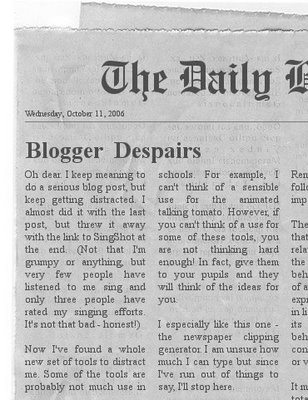
I have written before in this blog about some of the fun things you can do with photographs and websites like Flickr. (And I have had it in mind for ages to write another EduFlickr piece on a fun Flickr site... maybe next week.) However, thanks to Ollie Bray I found this site which allows you to generate newspaper clippings, like this:

Fake newspaper clipping

You can also generate clapper boards and animated talking tomatoes and... well go and have a look for yourself. However, where I really lost my way was when I moved from the newspaper site to the The Generator Blog. There are more links to software for generating fun images on this blog than you can shake a stick at!

Two of my favourites are The Dummies Book Cover (which I found on the Custom Sign Genrator list):

...and the Warning Sign Generator:
Have fun with these, and let me know when, and where you use them.

Technorati Technorati Tags: , , ,

Powered by performancing firefox

Tuesday, October 10, 2006

Video: Tag, you're it

I came across the veotag tool thanks to a post from Ewan on a meeting for East Lothian Glow mentors. In particular, he posted some videos of Don Ledingham (Head of Education for East Lothian Council, Scotland, UK) talking about East Lothian's policies. The videos are worth watching in their own right. Don says some good stuff in an interesting and accessible way. For example, I particularly liked his comment in Glow Mentors - Reversing Hierarchy for Mutual Benefit, that there no models of good practice. He said:
"You can have two teachers in adjacent rooms, teaching completely different ways and they can both be outstanding!"
Brilliiant! However, it is the veotag system that I think makes these videos really interesting. This system allows you to add chapter markers to your video and audio files. You can create a table of contents or a menu for your audio. Click on the chapter heading and jump directly to that part of the video. If that wasn't enough, you can also add tags and text to the different sections of video, so you can add notes or a transcript. It is very easy to use. I had a go with my Mentos video (see Back garden experiment for an explanation) and it was almost unbelievably simple to set up.

I think the educational potential for this is huge. Firstly, it makes video material much more accessible. For example, providing a transcript for people with hearing difficulties in this way is probably a lot easier than adding subtitles. Secondly, getting pupils to tag videos would be a great way to get them to interact with material rather than just passively watching or listening to it. Also, adding the tags and texts makes the content accessible to search engines.

Combining veotagging with Creative Archive material (currently offline during a consultation period) or other educational video and sound clips, perhaps from SCRAN or Teachers' TV, could be very exciting. I wonder if organisations like this would even start distributing pre-tagged material?

Finally, on a more or less unrelated matter, Derek Robertson brought a site called SingShot to my attention. It's essentially karaoke for the YouTube generation! Record yourself singing, rate others, leave comments - create a community of singers online. Brilliant! (Note Derek has just moved Hot Milky Drink to a new home.)

Why not listen to me murder a classic from the Monkees, rate me and leave a comment. Before you do however, can I say in my defence that my karaoke favourite, I'm a Believer, wasn't available and I had to record my singing with a cheapo webcam microphone. I may have a go later today with a better microphone... you have been warned.


Remember to rate Derek's efforts too. My favourite is his rendition of Word Up - especially the screaming at the end. :-)


Technorati Technorati Tags: , , , ,

Powered by performancing firefox

Friday, October 06, 2006

To boldly go...

I feel I have established my geek credentials on this blog many times over but I must be slipping since I missed this one... A colleague sent me an email from CNET with some news he thought I'd appreciate. He was right!

It's acting Jim...
It's acting Jim...,
originally uploaded by DavidDMuir
What am I talking about? Well it seems that a group of Star Trek fans are making a new series of the original Star Trek. {That's Star Trek: The Original Series or ST:TOS to those in the know. :-) } My colleague found out from a couple of video reports on CNET:
The fans have four episodes so far - two currently available and two in post production. It seems that Paramount is allowing them to make the episodes on the condition that they don't make any money from it. The episodes can be download free from the Star Trek New Voyages website.

Well that's a good chunk of my weekend sorted! :-)

P.S. I've just found news on the official Trek site that the same fans are involved in the production of a Star Trek movie! This movie is directed by Tim Russ (Tuvok) and stars various Star Trek actors, including Walter Koenig (Chekov) and Nichelle Nichols (Uhura). I guess that's next weekend booked too. :-)


Technorati Tags: , ,

Powered by performancing firefox

Thursday, October 05, 2006

National Poetry Day

I think this still counts as National Poetry Day, so here is my contribution.

A mousey sat by my computer
So I decided to shoot her
I took careful aim
But missed! What a pain
Instead, my computer got blootered!

Think you can do better? Feel free to add your own ICT inspired limericks in a comment.


Technorati Tags: , , ,

Powered by performancing firefox